Choose the zone and the right target
External maps call these targets Empyrean Traces, often described by players as feathers. Start with your home zone, then choose a small named region.
Verteron feather regions ↗ · Altgard feather regions ↗ · Collection reference ↗
A browser checkmark is a personal record. Check the matching in-game collectible or achievement before concluding a pickup is missing or complete.
Hide collected markers before searching
- Open your current game's map filter controls.
- Look for the category for content or collectibles and expand its sub-options.
- Inspect separate collected and uncollected entries, if your client provides them; hide collected entries and check a known location.
- If your menu differs, keep your client language and patch in the note. Do not assume an external website controls the game's map filter.
A community thread reports expanding Content and disabling collected-wing markers; the author and other players said they had missed the sub-options. This is a player-reported UI path, not a current-client verification by us. Read the filter discussion ↗
When a feather pin seems unreachable
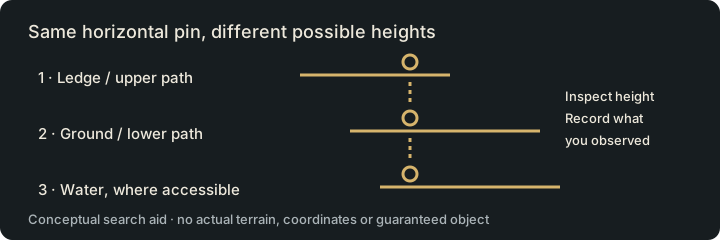
- Match a fixed landmark at the same zoom before moving toward the pin.
- Inspect upper and lower layers separately. A correct horizontal position can still be at the wrong height.
- Find a safe approach or landing route in the client. Do not spend a consumable on a guessed shortcut.
- If you still cannot identify it, record the landmark and which layers you checked; leave the target Searched, not Collected.
- After a real pickup, confirm the game's record, then update your own note. Disagreement between browser marks and the game needs review.
Work in a small region, then stop cleanly
Select a few nearby missing targets you can describe clearly. Start and finish at an accessible landmark. Combine targets with an existing journey only when you can see the actual path; a website pin alone does not establish a shortcut.
Verteron · Elyos
Choose a region session around Dawn Legion Base, Western Cantas Valley or Ellun River Midstream.
Choose a Verteron session →Altgard · Asmodians
Choose a region session around Safe Haven, Nameless Cemetery or Moslan Forest.
Choose an Altgard session →Save a feather target → · Review a feather-session task →
The planner only counts the targets you recorded. It never calls that number your full world completion. Repeatable Hidden Cube observations are not hidden by the feather completion filter.
Evidence and reward checks
Sources checked November 1, 2026: Aion2.gg map index and its data methodology. The map pages identify EU/NA client 2.0.9.0 / extraction October 28; linked database records may show an older snapshot. These are community client-data references, not our live-client test. Match the region, current client and place names before traveling. External providers control their maps and saved marks; their marks do not synchronize with Aion2Pilot.
Before chasing a completion threshold, read the current Monolith or achievement screen and identify the reward you actually need. We do not infer a skill-point amount, combat-power increase or reward eligibility from a map pin. Record an actual before/after CP change → if you want to measure an upgrade separately.