Start with a matching faction map
The community item reference describes cube keys and repeatable spawn candidates. Confirm your key and the exact interaction in your client before spending. A large number of map pins is not the number of cubes currently available.
Verteron cube layer ↗ · Altgard cube layer ↗ · Source and item context ↗
Pick one region you can already reach. Keep the key count as a spending limit, not a requirement to use everything this session. Use your current client to confirm item binding and any changed requirements.
A repeatable search procedure
- Locate yourself first. Match a named landmark and the area label between the game and the external map. If they disagree, stop following the pin until the zone and version are resolved.
- Limit the search. Choose one nearby candidate cluster and a return landmark. Avoid covering the entire map because one candidate is empty.
- Inspect height. Look above and below the horizontal location: accessible ledges, ground, overhead platforms and water where applicable. Do not assume the same height as your current path.
- Use sound as a clue. In a safe area, test whether your client exposes positional effects and adjust competing audio to a comfortable level. A sound alone does not identify the object or prove an exact position.
- Record the event you actually observed. Searched means you checked; Seen means you identified a cube; Opened means you completed its interaction. Keep those states separate.
- Move on deliberately. After checking accessible heights, write the next landmark or unresolved layer. An empty visit is not evidence of a broken character or an exact respawn timer.
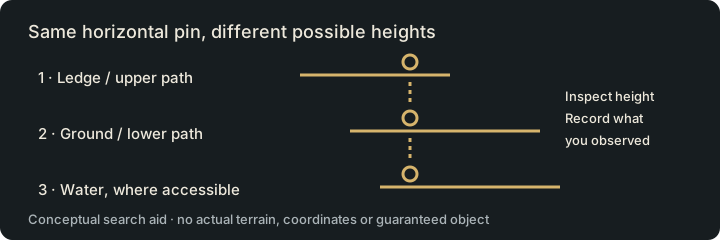
Why is the candidate empty?
| Symptom | Next check |
|---|---|
| Map marker, nothing visible | Check zone, height and source snapshot. The object may simply not be present. |
| Sound but no clear target | Pause, turn the view and inspect nearby vertical layers. Other objects may sound similar. |
| Cube visible, interaction fails | Read the client's error and item requirements. Record that message rather than assuming a bug. |
| Repeated empty visits | Change the session goal or region; avoid buying more keys just to justify time already spent. |
These are editorial troubleshooting branches, not confirmed explanations for a particular spawn. Player reports describe widely different search results; they do not establish a guaranteed yield.
Keep a search note, then continue
Example note structure: “region — landmark — heights checked — searched/seen/opened — next candidate.” Fill it with your own observations. Do not reuse a cube's Opened state as a permanent collection check.
Save my cube search targets → · Review a cube-search routine task →Verteron sessions · Altgard sessions · Collect feathers instead
Evidence and limits
Sources checked November 1, 2026: Aion2.gg map index and its data methodology. The map pages identify EU/NA client 2.0.9.0 / extraction October 28; linked database records may show an older snapshot. These are community client-data references, not our live-client test. Match the region, current client and place names before traveling. External providers control their maps and saved marks; their marks do not synchronize with Aion2Pilot.
Our procedure is an original planning aid, not a tested farming route. No exact respawn interval, guaranteed drop, keys-per-hour or CP gain is supplied. The linked item-source list does not establish drop probabilities.